
Appearance
Command Line Options
The following sections explain the different options available when running EMRALD through the command prompt. Options can be manually specified in the command line or input via a .json file.
Option Flags
Flag | Description |
|---|---|
| -h | Opens the "Help" menu |
| -n | Specifies the number of runs |
| -i | Specifies the input model file path |
| -r | Specifies the results file path |
| -o | Specifies the output file path |
| -jsonStats | Writes path statistics to JSON output file at specified directory |
| -t | Specifies the maximum time for each run |
| -e | Runs the simulation |
| -c | Coupled external simulation using XMPP, specify the password and the external sim name, XMPP connection resource, XMPP user name and timeout in seconds. If there is more than one, put each in brackets. Example: -c xmppServerPassword [LinkedProgram MyApp User1 60] [LinkedProgram2 MyApp2 User2 60] |
| -m | Specifies the parameters to monitor. Use brackets for multiple variables. Example: [x y z] |
| -s | Specifies the initial random number seed |
| -d | Specifies the debug level, either "basic" or "detailed", and an optional range Example: -d basic [10 20] |
| -rIntrv | Specifies how often to save the path results, every X number of runs. No value or <1 will result in saving only after all runs are complete. |
| -mergeResults | Merges two JSON path result files into a single file and estimates the 5th and 95th Example: -mergeResults c:/temp/PathResultsBatch1.json c:/temp/PathResultsBatch2.json c:/temp/PathResultsCombined.json |
Options JSON File
Alternatively, the user may create a dedicated .json file to specify options. The options file has the following format: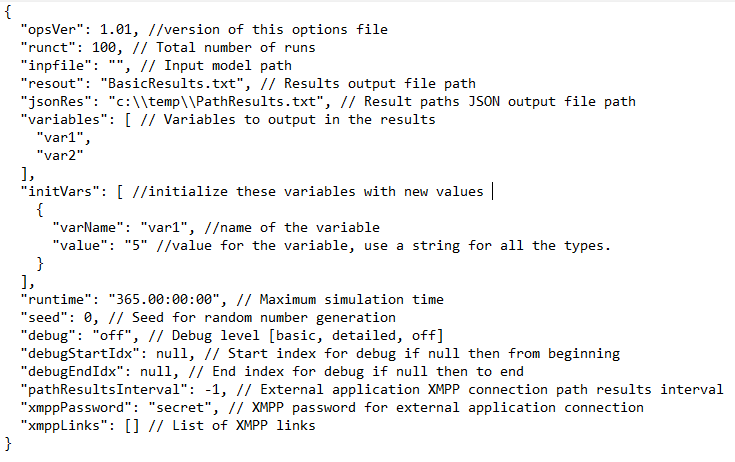
This allows the user to prefill and run the simulation with only two arguments in the command line.
> [path/to/EMRALD_Sim.exe] [path/to/options/file]